
Markup Percentage Calculator
Markup and margin are both percentages of profit, but they measure it against different numbers. Enter any two of cost, selling price, markup and margin and the calculator finds the rest, shows the formulas, and converts between markup and margin — so you can price products correctly and avoid the classic mistake of confusing the two.
- Free to use
- No sign-up
- Runs in your browser
Markup and margin calculator
Pricing Toolkit
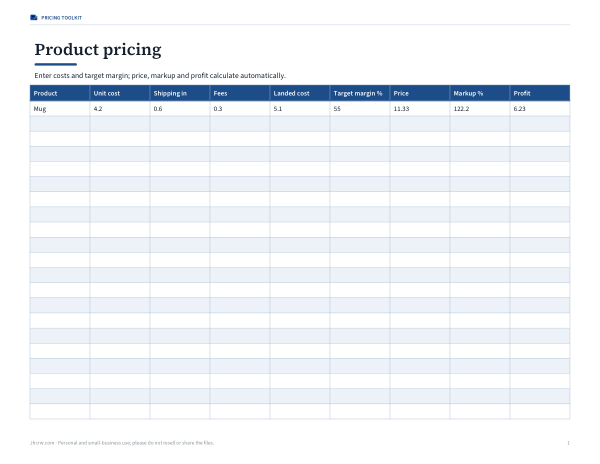
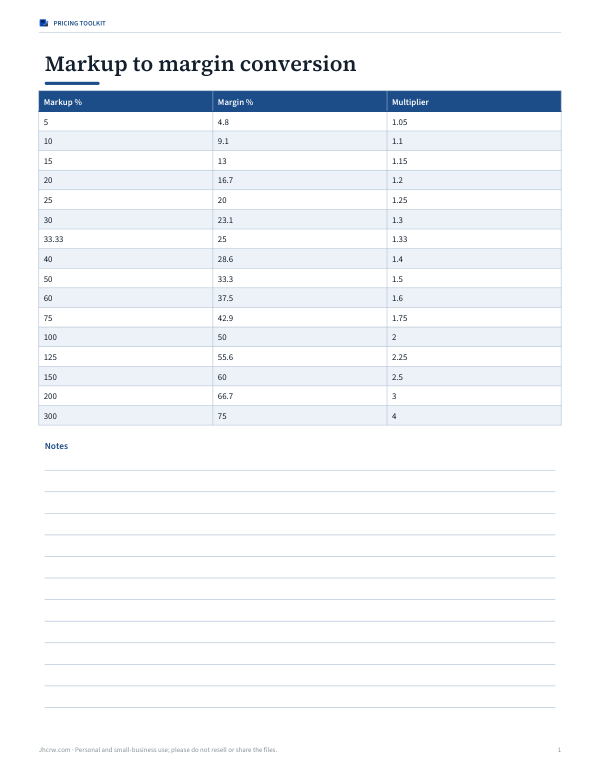
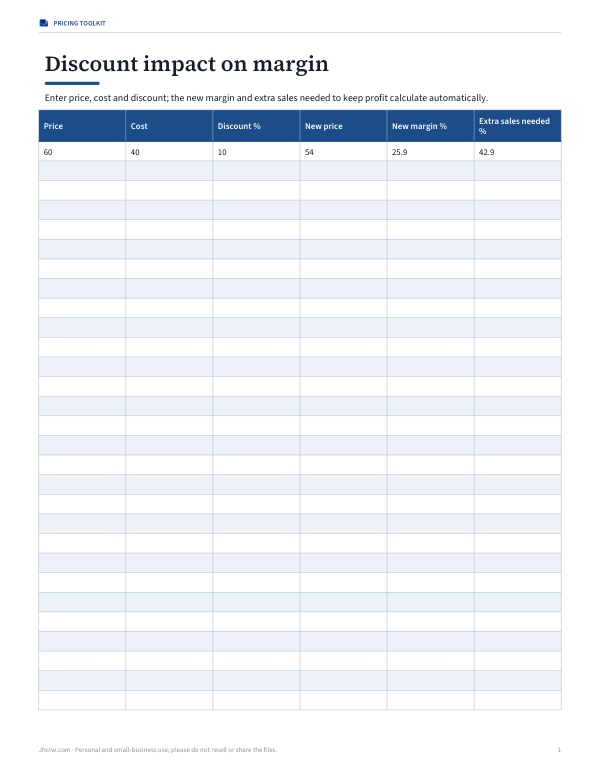
Excel pricing workbook (landed cost, markup, margin and price for a product list), a markup-to-margin conversion chart, a pricing strategy worksheet and a discount impact calculator.
- Pricing workbook (XLSX)
- Conversion chart (PDF)
- Discount impact (XLSX)
Formats: XLSX, PDF. Instant download after payment (link valid 72 hours, up to 5 downloads). AI-assisted: the templates were drafted with AI help and reviewed and laid out before publishing.
$3.00 USD, one-time 3 files · about $1.00 each
- Instant download
- 7-day refund
- Secure checkout by Stripe
7-day money-back guarantee. Full refund within 7 days of purchase, even after you download.
Full refund within 7 days — see the refund policy and license.
Free printables
Single sheets you can print right now, no sign-up. The full pack adds every sheet in one download plus the editable files.
Markup vs margin
| Markup | Margin | |
|---|---|---|
| Compares profit with | Cost | Selling price |
| Formula | (price − cost) ÷ cost × 100 | (price − cost) ÷ price × 100 |
| $40 cost, $60 price | 50% | 33.3% |
| Can exceed 100%? | Yes | No |
| Typically used for | Setting prices from cost | Reporting profitability |
The same sale always has a higher markup percentage than margin percentage. Confusing the two is a common pricing error: adding a “30% margin” as a 30% markup gives only a 23% margin.
Formulas
| Find | Formula |
|---|---|
| Selling price from markup | cost × (1 + markup) |
| Selling price from margin | cost ÷ (1 − margin) |
| Cost from price and margin | price × (1 − margin) |
| Margin from markup | markup ÷ (1 + markup) |
| Markup from margin | margin ÷ (1 − margin) |
Use decimals in the formulas: 50% = 0.5.
How to use the calculator
- Choose what you know: cost and price, cost and markup, cost and target margin, or price and margin.
- Enter the two values; the other fields are ignored (shown faded).
- Read the price, profit, markup, margin and multiplier.
- Add a sales tax rate to see the price including tax.
- Use the table to compare common markups and their equivalent margins.
Worked example
An item costs $40 and sells for $60. The profit is $20, so the markup is $20 ÷ $40 = 50% and the margin is $20 ÷ $60 = 33.3%. To achieve a 40% margin on the same $40 cost, the price must be $40 ÷ (1 − 0.40) = $66.67 — a markup of 66.7%. Simply adding 40% to cost would give $56, a margin of only 28.6%.
Common markup to margin conversions
| Markup | Margin |
|---|---|
| 10% | 9.1% |
| 20% | 16.7% |
| 25% | 20% |
| 33.3% | 25% |
| 50% | 33.3% |
| 75% | 42.9% |
| 100% | 50% |
| 150% | 60% |
| 200% | 66.7% |
Choosing a markup
- Include all costs in “cost”: product, shipping in, packaging and payment fees — or price from a full landed cost.
- Check competitor prices and what customers expect to pay.
- Consider volume: low-margin, high-volume items versus high-margin specialist goods.
- Leave room for discounts and promotions.
- Review prices when costs change; a fixed markup keeps margin steady.
Pricing for services and labour
Markup also applies to services. A contractor who pays an employee $30 an hour in wages and on-costs might bill that time at $60 — a 100% markup and 50% margin — to cover overheads such as vans, tools, insurance, admin and profit. Materials are often marked up separately, perhaps 10–30%. Work out your full overheads per billable hour and check that your markups cover them before adding profit.
Break-even and markup
A product can show a healthy markup and still lose money if fixed costs are not covered. Divide your monthly fixed costs (rent, software, salaries) by the gross profit per unit to find how many units you must sell to break even. If that number is unrealistic, raise the price, cut costs, or focus on products with a bigger profit per sale.
Discounts and margin
| Starting margin | 10% discount leaves | 20% discount leaves |
|---|---|---|
| 50% | 44.4% | 37.5% |
| 40% | 33.3% | 25.0% |
| 30% | 22.2% | 12.5% |
| 25% | 16.7% | 6.3% |
A discount comes straight out of profit, so the lower your margin, the more a discount hurts. At a 30% margin, a 20% discount cuts profit per sale by more than half.
Setting prices step by step
- Work out the full landed cost of one unit, including inbound shipping, duties, packaging and payment or marketplace fees.
- Decide the gross margin you need to cover overheads and profit.
- Calculate the price as cost divided by one minus the margin.
- Round to a sensible price point and recheck the margin.
- Compare with competitors and adjust your product mix, not just the price.
- Review every time supplier costs or fees change.
Why margin matters for reporting
Accountants and investors usually talk about gross margin rather than markup because margin can be added up across products and compared with revenue on the income statement. If your total sales are $100,000 and gross profit is $35,000, your gross margin is 35% — however the individual items were marked up.
Industry examples
Typical markups vary widely: groceries often run on thin margins and rely on volume, while jewellery, cosmetics, restaurants (on drinks especially) and fashion commonly use much higher markups to cover waste, stock that doesn’t sell, rent and staff. These are general patterns, not rules — your own costs and market set the right figure.
Keystone pricing
In retail, “keystone” means doubling the wholesale cost — a 100% markup, or 50% margin. It is a quick rule of thumb, but many products need more (for high handling or storage costs) or less (for competitive commodities). The calculator shows the exact margin for any markup so you can see what a rule of thumb really delivers.
Privacy
The calculator runs in your browser; nothing is uploaded.
Frequently asked questions
What is the difference between markup and margin?
Markup is profit as a percentage of cost; margin is profit as a percentage of price.
How do I calculate a 30% markup?
Multiply the cost by 1.30.
What markup gives a 50% margin?
100% markup (doubling the cost).
How do I calculate selling price from margin?
Price = cost ÷ (1 − margin).
Can margin be more than 100%?
No; markup can, but margin can’t.
What is a good profit margin?
It depends on the industry and costs; compare with your own break-even point rather than a single target.
Is gross margin the same as net margin?
No — gross margin only deducts product cost; net margin deducts all expenses.
Is my data stored?
No, it runs in your browser.